
Posts and Shares Explained
In this article
In this article group
- Share a Post with Multiple Images to LinkedIn
- Impression Analytics
- Share to X
- What to Know About Character Limits
- Share to Facebook
- Image Specifications for Sharing Photos on Social Networks
- Mention People and Companies in Shares
- How Does a Link Post Work
- How Does a Text Post Work
- Maximize Your Time Using the Scheduler
- How Does an Image Post Work
- Share Content Using the Mobile App
- Video Specifications for Sharing Videos on Social Networks
- Delete Your Account in EveryoneSocial
- Contact EveryoneSocial Support
- LinkedIn Share Components
- How EveryoneSocial Uses Social Network Permissions
- How Leaderboards Work
- How Public Post Pages Work
- How to Reshare Content
- Join a Group
- How to Choose a Post Type
- Instagram and EveryoneSocial Overview
- Share a Document to LinkedIn
- Manage Email and Push Notifications
- Manage Profile Settings
- How to Leave a Group
- Add Stickers to Images When Sharing on Mobile
- A Comprehensive List of Emails and Push Notifications from EveryoneSocial
- Find Your Lane: Building Topical Authority
- TikTok and EveryoneSocial Overview
- YouTube and EveryoneSocial Overview
- How EveryoneSocial's Search Works
- Configuring the EveryoneSocial iOS App with AppConfig (EMM)
- Choosing a Share Copy Option
- View Performance on a Share You Made
- Invite Colleagues and Earn Referral Points
Facebook posts, LinkedIn posts, EveryoneSocial posts... There are so many "posts” that it can be hard to know what post refers to and how shares differ. What is meant when we say “posts” at EveryoneSocial, and how do shares fit in?
One of the ways we can understand posts and shares is to consider a community’s bulletin board. Ever heard the old-fashioned expression “posting mail” or “posting a message?” This expression references when someone would post something on a bulletin board to share a message with the community. The bulletin board had flyers marketing homes for sale, job opportunities, tutors looking for work, and even puppies for sale. Flyers would be considered “posts” once pinned to the bulletin board. You might hear someone asking “Did you see the post this evening?”

That said, the post didn’t always stay on the bulletin board. It was designed to be shared. Be it by word of mouth or by taking a flyer from the board, posts were shared with others.
This little history lesson helps to understand the origins of posts and shares and explains how we still understand the concept today.
Posts, put simply, are content in the location the original author created it—those posts might be shared to other locations, but the post refers to the original. Shares, in contrast, are copies of the content out in the wild.
Posts explained
Posts are pieces of content published on the internet in the form of text, images, and video. Individuals and companies can publish posts that are typically used to increase engagement and visibility.
While posts can exist on other platforms, EveryoneSocial uses the term "post" when the content was originally published on the platform. All content that was originally created in EveryoneSocial is a post.
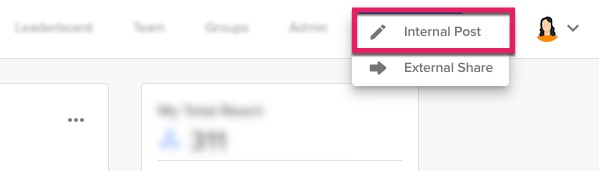
Here are some examples.
- You share posts from EveryoneSocial to social platforms, such as Slack.
- If you write the content on EveryoneSocial and share it to LinkedIn, we will refer to it as a LinkedIn share when talking about the content on LinkedIn.
- You can create an engageable post using a link to a Facebook post.
- Posts are the published content in your Workspace that you can read and share.
Let’s look at how shares differ.
Shares explained
Shares are content created on one platform and shared on another social platform, such as Facebook, LinkedIn, and X. The purpose is to share content with followers and connections to increase engagement and visibility.
EveryoneSocial uses "share" to indicate posts created in EveryoneSocial that are shared elsewhere.
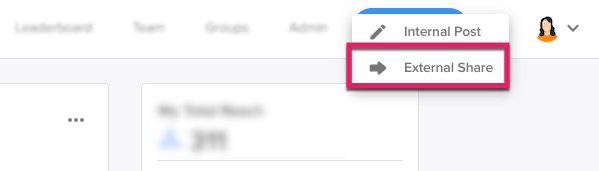
Here are some examples.
- Posts become shares when a team member shares content from EveryoneSocial to another platform.
- A LinkedIn share is content shared to LinkedIn from EveryoneSocial.
- Only shareable posts become shares. Internal-only posts can not become shares.
- A Leaderboard was created to encourage social selling, and shares are valued at 10 points each.
Still a bit confused? That’s okay. We’ve found the easiest way to remember is by looking at where the content was initially published and where it’s currently hosted. If it was in EveryoneSocial (the bulletin board) then it’s a post; if it was shared from EveryoneSocial to somewhere else, then it’s a share.
When in doubt, we can always help. Feel free to connect with our Support team whenever you have a question.