
Why is my Leaderboard losing points?
In this article
In this article group
- Share Content to a Company's LinkedIn Page
- Review Share Analytics
- Understanding Leaderboard Point Values
- Social Media Policy Best Practices
- Active User Overview
- Review Posts Analytics
- Review User Analytics
- Understanding Disclosures: How to Create and Use Them
- Block Words From Being Shared Using Blocklist
- Admin Tab: User Management Overview
- Create a Segment
- Create a Private Group and Add Members
- Admin Analytics and ROI Dashboard
- Create Content Emails
- Review Group Analytics
- Group Examples for a Successful Workspace
- Content Email Best Practices
- Create and Customize Leaderboards
- Measure a Program's ROI
- Set Engageable Posts Default Share and Engage Buttons (Post CTAs)
- Release Notes
- Submit an Idea to the EveryoneSocial Product Team
- Admin Posting Permissions
- Require a Social Media Policy During Onboarding
- Branded Content Metrics and Incentives
- Manage Segments
- Update Language Settings
- Upload Custom Stickers to Use on the Mobile App
- Send Users a Message with EveryoneSocial
- View Our Roadmap
- Review Leaderboard Analytics
- View Analytics for Posts with Multiple Share Copy and Image Versions
- Content Email Data
- Manage Content Emails
- Sign up for the Early Adopter Program
- Delete a Group
- Brand Voice for AI-Generated Copy
- Configure a Group's Settings
- Assign Moderators to a Group
- Company Pages and Data Pulling
Each Workspace comes with a default Rolling 30 Days Leaderboard that assigns points based on activities occurring within the most recent 30 days. The Rolling 30 Days Leaderboard is the only Leaderboard that has the ability to lose points based on the time you are viewing the Leaderboard.
To confirm this is the Leaderboard that points are decreasing on, check the timeframe located on the top right of the Leaderboard screen.
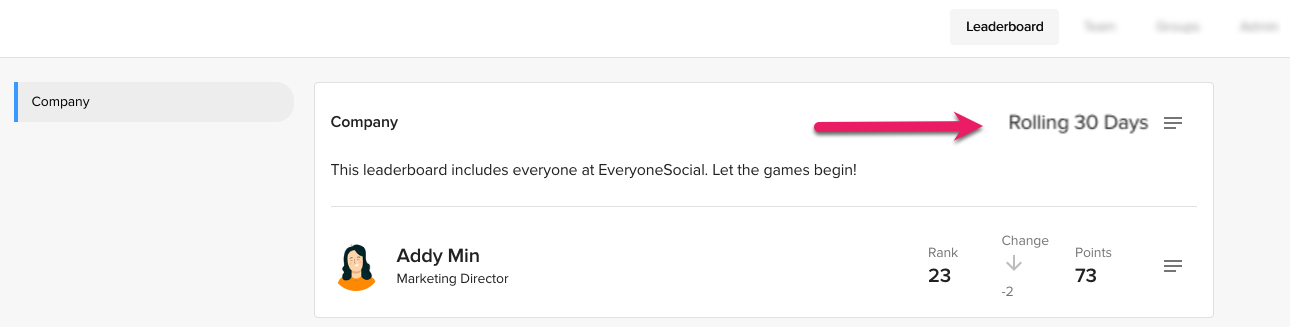
Using the above as an example, if Addy Min created a share on June 1 that earned 100 points, 31 days later—on July 1—those 100 points would disappear. Addy Min would still have points for other activities within the last 30 days.
Other Leaderboard types
If you have a paid plan, Workspaces can have Leaderboards track points on an ongoing basis or within fixed dates. Timeframes are selected by Admins and points are awarded within the timeframe selected.
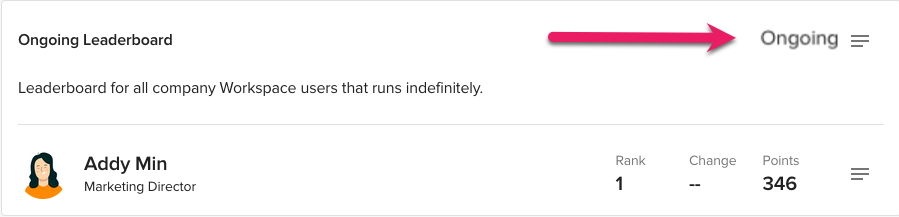
In the example above, the Leaderboard is set to capture points forever because it is ongoing. If there was a specific date range listed, such as June 1 - October 1, points will be awarded during that timeframe. On October 2, the Leaderboard will cease to capture new points, but it can be viewed as long as it is still active.
Don’t see the answer you need?
We're happy to look into any discrepancies you see on Leaderboards. Please reach out to our Support team so we can investigate further!